

published · approved · 47 KiB
Workshop mod by domagoj91
2HGZ-Compositor Arma Reforger Mod
Save placed GM objects as reusable compositions. Browse them with Ctrl+Tab, preview in 3D, and place them with a full ghost that follows terrain. Private or shared with all GMs.
A8C3AB4FC36A6BCF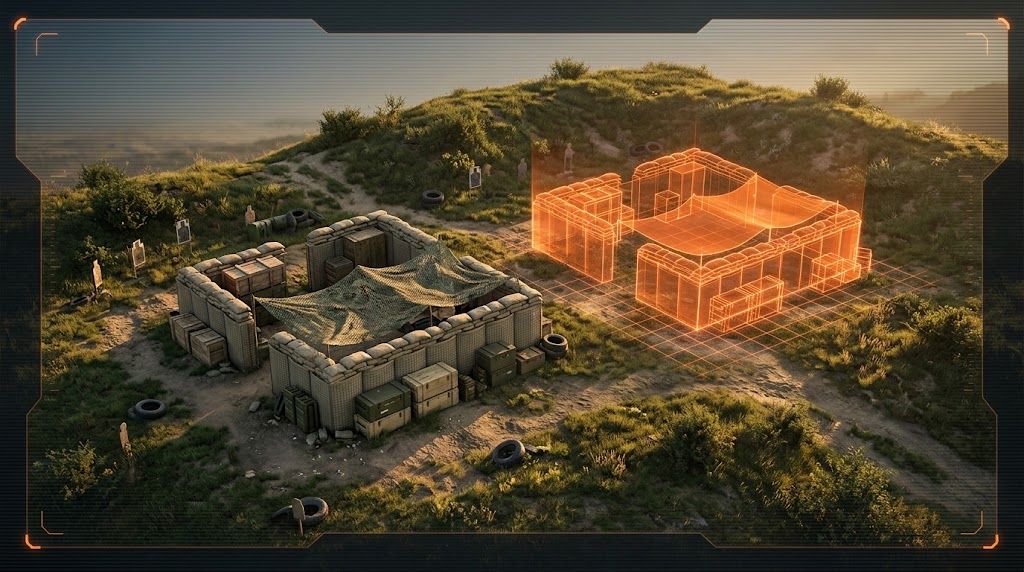
Ranking
Popular#535877.1Falling#218265.5
7Serversrunning this mod
3Observed players nowon servers reporting this mod
491Estimated player-hours (7d)7-day data
DeploymentTop 17%82.8ahead of 83% of tracked mods by servers running it
ActivityTop 31%68.6ahead of 69% of tracked mods by play on those servers
Popularity77.1deployment and activity combined
How those 7 installs happen100% traced
- Not identified as a dependency7
Last 30 days
8 latest10 peak, 18 Oct1 low, 9 Oct
Servers reporting the mod in each hourly observation. Covers 10 days of the last 30 days.
Daily values
| Day | Last | Peak | Low | Obs. |
|---|---|---|---|---|
| 9 Oct | 1 | 1 | 1 | 4 |
| 10 Oct | 6 | 6 | 1 | 24 |
| 11 Oct | 6 | 6 | 4 | 24 |
| 12 Oct | 5 | 6 | 5 | 24 |
| 13 Oct | 5 | 7 | 5 | 24 |
| 14 Oct | 6 | 8 | 5 | 24 |
| 15 Oct | 7 | 9 | 7 | 24 |
| 16 Oct | 6 | 7 | 5 | 24 |
| 17 Oct | 7 | 8 | 5 | 24 |
| 18 Oct | 10 | 10 | 7 | 24 |
| 19 Oct | 8 | 10 | 7 | 15 |
2 latest31 peak, 18 Oct0 low, 9 Oct
Sampled player counts on servers reporting the mod; not unique players. Covers 10 days of the last 30 days.
Daily values
| Day | Last | Peak | Low | Obs. |
|---|---|---|---|---|
| 9 Oct | 0 | 1 | 0 | 4 |
| 10 Oct | 2 | 6 | 0 | 24 |
| 11 Oct | 2 | 20 | 0 | 24 |
| 12 Oct | 0 | 3 | 0 | 24 |
| 13 Oct | 0 | 6 | 0 | 24 |
| 14 Oct | 3 | 16 | 0 | 24 |
| 15 Oct | 0 | 5 | 0 | 24 |
| 16 Oct | 3 | 8 | 1 | 24 |
| 17 Oct | 9 | 9 | 0 | 24 |
| 18 Oct | 9 | 31 | 0 | 24 |
| 19 Oct | 2 | 6 | 0 | 15 |
Calculated Oct 19, 2026, 2:45 PM UTCDerived from observed server and mod activity. Trend positions describe recent observed change, not future adoption.
Summary
Save placed GM objects as reusable compositions. Browse them with Ctrl+Tab, preview in 3D, and place them with a full ghost that follows terrain. Private or shared with all GMs.
Official Workshop description
**Description**
**2HGZ Compositor — custom compositions for Game Masters**
Build something once and place it again whenever you need it, like a shoot house, a checkpoint, a firebase or a training lane. 2HGZ Compositor lets Game Masters save any group of placed objects as a composition on the server, then browse, preview and place it like vanilla GM content.
**Saving**
- Select the placed objects (sandbag walls, props, fortifications, crates and so on), right-click and choose **Save as composition (2HGZ)**.
- Give it a name and a category, and choose **Private** (only you) or **Shared** (every GM on the server).
- Characters, vehicles, AI groups, waypoints and tasks are skipped automatically, and you're told how many were left out.
- You can overwrite an existing composition with a new selection, so it's easy to keep layouts up to date.
**Browsing**
- Open the composition browser with **Ctrl+Tab**, the **Compositions (2HGZ)** toolbar button, or right-click on empty ground. Tab still opens the vanilla content browser.
- Search by name, and filter by category or by **All / Mine / Shared**.
- See a **3D preview** of each composition: it rotates slowly, you drag to orbit and use the mouse wheel to zoom. A top-down blueprint view shows the exact footprint and placement point.
- Each entry lists its contents (for example "24 × Sandbag wall"), size, author, age and the map it was built on.
- Objects from mods that aren't loaded are flagged.
**Placing**
- Click **PLACE** and a ghost of the whole composition follows your cursor, using normal GM placement: rotate, adjust height, keep placing copies.
- On uneven ground, each object follows the terrain under it and keeps its height and tilt relative to the ground. Sea-level mode keeps the composition rigid.
- Placed objects are normal GM entities, grouped under one composition named after what you saved. Move or delete it as a unit, or enter it to edit single parts.
**Private and shared**
- Private compositions are visible only to the GM who saved them. Shared compositions are available to every GM on the server.
- Only the author, or a server admin for shared ones, can switch a composition between private and shared.
- The server checks every action, so private compositions stay private.
**For server admins**
- Compositions are stored as one JSON file each in `profile/2HGZ_Compositor/compositions/`. You can copy them between servers.
- `settings.json` sets the limits: objects per composition (400), total compositions (1000), private compositions per GM (200) and objects spawned per frame (20). It also sets whether only authors and admins may change shared compositions.
- The mod is standalone. It has no dependencies and doesn't override vanilla configs, layouts or action lists, so it works alongside other GM mods.
**Notes**
- Vanilla compositions are saved as their original prefab, so changes made inside them aren't kept.
- After a saved game is loaded, a placed composition's group shows as "Custom composition" instead of its name.
---
Servers running this mod
77 currently listed servers report 2HGZ-Compositor in its mod list. Showing the 5 with the most players.
- 1st Battalion, Ranger Regiment [UK] | PvPvE Milsim |Online · Chernarus Minus Game Master1 / 20players
- ASCOnline · #AR-Editor_Mission_GM_Kolguyev_Name1 / 6players
- 2.HGZ | Campaign serverOnline · Game Master - Zarichne0 / 128players
- 2.HGZ | TestServerOnline · Game Master - Zarichne0 / 64players
- 2.HGZ | TuđmaraOnline · Tudjmara0 / 128players
Versions
21.0.1Game 1.8.0.13 · 47 KiB · Oct 10, 2026
Dependencies: 0Scenarios: 0PublishedApproved
Added multipart/singlepart toggleconfig.json entry
{
  "modId": "A8C3AB4FC36A6BCF",
  "name": "2HGZ-Compositor",
  "version": "1.0.1"
}Use 2HGZ-Compositor on your server
Add 2HGZ-Compositor to the game.mods array of your server config.json. The config generator builds the full file, the mod manager keeps the mod list and its dependencies organized, and the config validator checks an existing config. The adding mods guide and mod dependencies guide walk through it step by step.
Fetch this mod from the API
The same metadata is available as JSON. See the API quickstart, the V2 reference, or the V1 reference.
GET https://api.reforgermods.net/v2/mods/A8C3AB4FC36A6BCF
GET https://api.reforgermods.net/v2/mods/A8C3AB4FC36A6BCF/versions
Data is cached from Arma Reforger Workshop metadata and may be stale. reforgermods.net is independent and is not affiliated with Bohemia Interactive.