

published · approved · 7.87 MiB
Workshop mod by _Moskau_
TWS - Mortar Tablet Arma Reforger Mod
Mortar tablet control in bio
7A3C5D1E00000001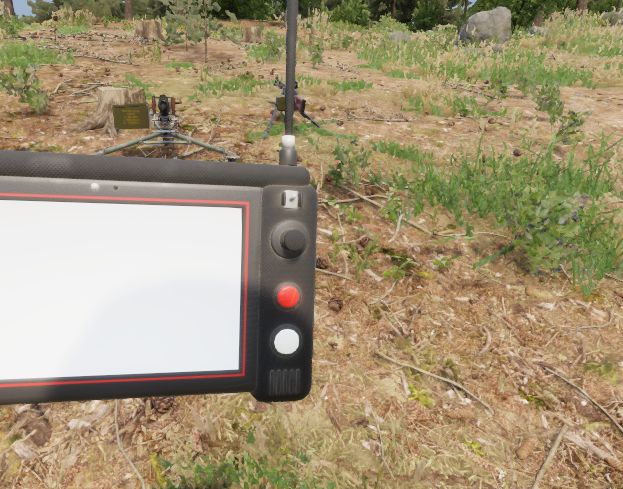
Ranking
Popular#566476.0Falling#301851.4
6Serversrunning this mod
9Observed players nowon servers reporting this mod
483Estimated player-hours (7d)7-day data
DeploymentTop 19%81.0ahead of 81% of tracked mods by servers running it
ActivityTop 32%68.4ahead of 68% of tracked mods by play on those servers
Popularity76.0deployment and activity combined
How those 6 installs happen100% traced
- Not identified as a dependency6
Last 30 days
6 latest6 peak, 18 Oct0 low, 8 Oct
Servers reporting the mod in each hourly observation. Covers 13 days of the last 30 days.
Daily values
| Day | Last | Peak | Low | Obs. |
|---|---|---|---|---|
| 6 Oct | 1 | 1 | 1 | 4 |
| 7 Oct | 1 | 1 | 1 | 24 |
| 8 Oct | 1 | 1 | 0 | 24 |
| 9 Oct | 2 | 2 | 2 | 24 |
| 10 Oct | 3 | 3 | 2 | 24 |
| 11 Oct | 3 | 4 | 3 | 24 |
| 12 Oct | 4 | 4 | 2 | 24 |
| 13 Oct | 5 | 5 | 3 | 24 |
| 14 Oct | 3 | 4 | 2 | 24 |
| 15 Oct | 3 | 3 | 2 | 24 |
| 16 Oct | 3 | 4 | 2 | 24 |
| 17 Oct | 3 | 4 | 2 | 24 |
| 18 Oct | 6 | 6 | 3 | 24 |
| 19 Oct | 6 | 6 | 5 | 15 |
9 latest17 peak, 18 Oct0 low, 6 Oct
Sampled player counts on servers reporting the mod; not unique players. Covers 13 days of the last 30 days.
Daily values
| Day | Last | Peak | Low | Obs. |
|---|---|---|---|---|
| 6 Oct | 0 | 2 | 0 | 4 |
| 7 Oct | 0 | 0 | 0 | 24 |
| 8 Oct | 0 | 1 | 0 | 24 |
| 9 Oct | 0 | 3 | 0 | 24 |
| 10 Oct | 2 | 2 | 0 | 24 |
| 11 Oct | 0 | 4 | 0 | 24 |
| 12 Oct | 1 | 4 | 0 | 24 |
| 13 Oct | 1 | 3 | 0 | 24 |
| 14 Oct | 2 | 3 | 0 | 24 |
| 15 Oct | 2 | 5 | 0 | 24 |
| 16 Oct | 1 | 5 | 0 | 24 |
| 17 Oct | 3 | 8 | 0 | 24 |
| 18 Oct | 15 | 17 | 0 | 24 |
| 19 Oct | 9 | 13 | 2 | 15 |
Calculated Oct 19, 2026, 2:03 PM UTCDerived from observed server and mod activity. Trend positions describe recent observed change, not future adoption.
Summary
Mortar tablet control in bio
Official Workshop description
Mortar tablet just take a look by u self
TRK-900 MORTAR TABLET - CONTROLS
The tablet shows the map, your target and the firing data for up to 4 mortars.
It does NOT fire or aim the mortar for you - the gunner lays the mortar by hand using the values on the tablet.
-----------------------------------------
GETTING STARTED
-----------------------------------------
1. Take the "TRK-900 Mortar Tablet" from the arsenal (Equipment).
2. Go to a mortar (2B14 or M252) and select "Connect Mortar Tablet". Repeat for up to 4 mortars (range 1500 m).
3. Equip the tablet and inspect it. Look at the Power switch (right side) and select "Open Tablet".
4. Turn the tablet on: flip the POWER switch, then the SYSTEM switch. The tablet boots and logs in.
5. Move the crosshair onto the target and press ENTER. The firing data appears.
6. Lay the mortar by hand. The mortar list shows how far off it still is (e.g. "AZ +12 EL -5").
When it shows a green "LAID", the mortar is on target.
-----------------------------------------
MOUSE & KEYBOARD
-----------------------------------------
Click the buttons on the tablet with the mouse. Joysticks: hold the left mouse button on the stick and drag.
POWER switch ........ Device on / off
SYSTEM switch ....... Boot system (login)
ANTENNA switch ...... Radio link to the mortars on / off
Power button (top right) ...... Standby (screen off)
Sun button (top left) ......... Brightness (10 steps, each press darker)
Left joystick ....... Move the map
Right joystick ...... Move the crosshair
D-pad up / down ..... Select mortar (in menus: select line)
D-pad left / right .. Zoom out / zoom in
LOCK ................ Zoom in step by step (after the last step back to full map)
ENTER ............... Set target at the crosshair
REC ................. Save target to the target list
MENU ................ Menu (Map, Mortars, Target List, Fire Calculator, Comms)
MODE ................ Angles in mils / degrees
COMM ................ Comms page (link status, distance)
BACK ................ Back / clear target
FIRE ................ Not used
Close the tablet: ESC, F, right click, or click outside the tablet.
-----------------------------------------
CONTROLLER / CONSOLE
-----------------------------------------
View ................ Device on / off (Power + System)
Left stick / D-pad .. Move the map (in menus: select line)
Right stick ......... Move the crosshair
LT / RT ............. Zoom out / zoom in
LB / RB ............. Previous / next mortar
A ................... Set target (Enter)
B ................... Back (closes the tablet if there is nothing to go back to)
X ................... Save target (Rec)
Y ................... Menu
L3 .................. Angles in mils / degrees
R3 .................. Brightness
Start ............... Close the tablet
-----------------------------------------
THE SCREEN
-----------------------------------------
Top bar ........ Units, target grid, signal strength, time
Map ............ Mortars (M1-M4), crosshair, target (red), saved targets (T1-T9), grid
Right panel .... Mortars: status ("AZ / EL" still to adjust, "LAID", "OUT OF RANGE", "NO LINK"),
shells in the mortar, distance to the mortar
Bottom bar ..... Firing data for the selected mortar:
TGT (target grid), DIST (distance), AZ (azimuth), ELEV (elevation),
CHG (charge rings), TOF (time of flight)
-----------------------------------------
MENU PAGES
-----------------------------------------
Mortars ........... ENTER select mortar, REC unlink mortar
Target List ....... ENTER set as target, REC delete
Fire Calculator ... All values to lay the selected mortar by hand, plus the current tube position
Comms ............. Link status and distance of every mortar, antenna state
Servers running this mod
66 currently listed servers report TWS - Mortar Tablet in its mod list. Showing the 5 with the most players.
- [ITA] JHQ ARES | Joint HQ ARES | Italian Peacekeeping ANIZAYOnline · COIN-GWOT Anizay8 / 50players
- [US/EU] Kill The 2% | RHS | Modern Factions | Paratroops |Online · Mike's Invade And Annex0 / 32players
- LOFConflict PvEOnline · Merak PvE0 / 42players
- Savannah Command - Operation Phoenix - Halo Arma ServerOnline · ROR Conflict URF - Everon PVE 4x0 / 40players
- SOTTI TESTOnline · COE2 - Kolguyev0 / 128players
Versions
40.0.4Game 1.8.0.13 · 7.87 MiB · Oct 6, 2026
Dependencies: 0Scenarios: 0PublishedApproved
No changelog text is available for this version.
config.json entry
{
  "modId": "7A3C5D1E00000001",
  "name": "TWS - Mortar Tablet",
  "version": "0.0.4"
}Use TWS - Mortar Tablet on your server
Add TWS - Mortar Tablet to the game.mods array of your server config.json. The config generator builds the full file, the mod manager keeps the mod list and its dependencies organized, and the config validator checks an existing config. The adding mods guide and mod dependencies guide walk through it step by step.
Fetch this mod from the API
The same metadata is available as JSON. See the API quickstart, the V2 reference, or the V1 reference.
GET https://api.reforgermods.net/v2/mods/7A3C5D1E00000001
GET https://api.reforgermods.net/v2/mods/7A3C5D1E00000001/versions
Data is cached from Arma Reforger Workshop metadata and may be stale. reforgermods.net is independent and is not affiliated with Bohemia Interactive.