

published · approved · 179 KiB
Workshop mod by propst81
AiO Command Menu -Reforger- Arma Reforger Mod
A numbered command menu for your AI squad: move, flank, assault, suppress, take cover, garrison, rearm and more, on the number keys. Reforger port of Leopard20's All-in-One Command Menu.
629405AEFC950C12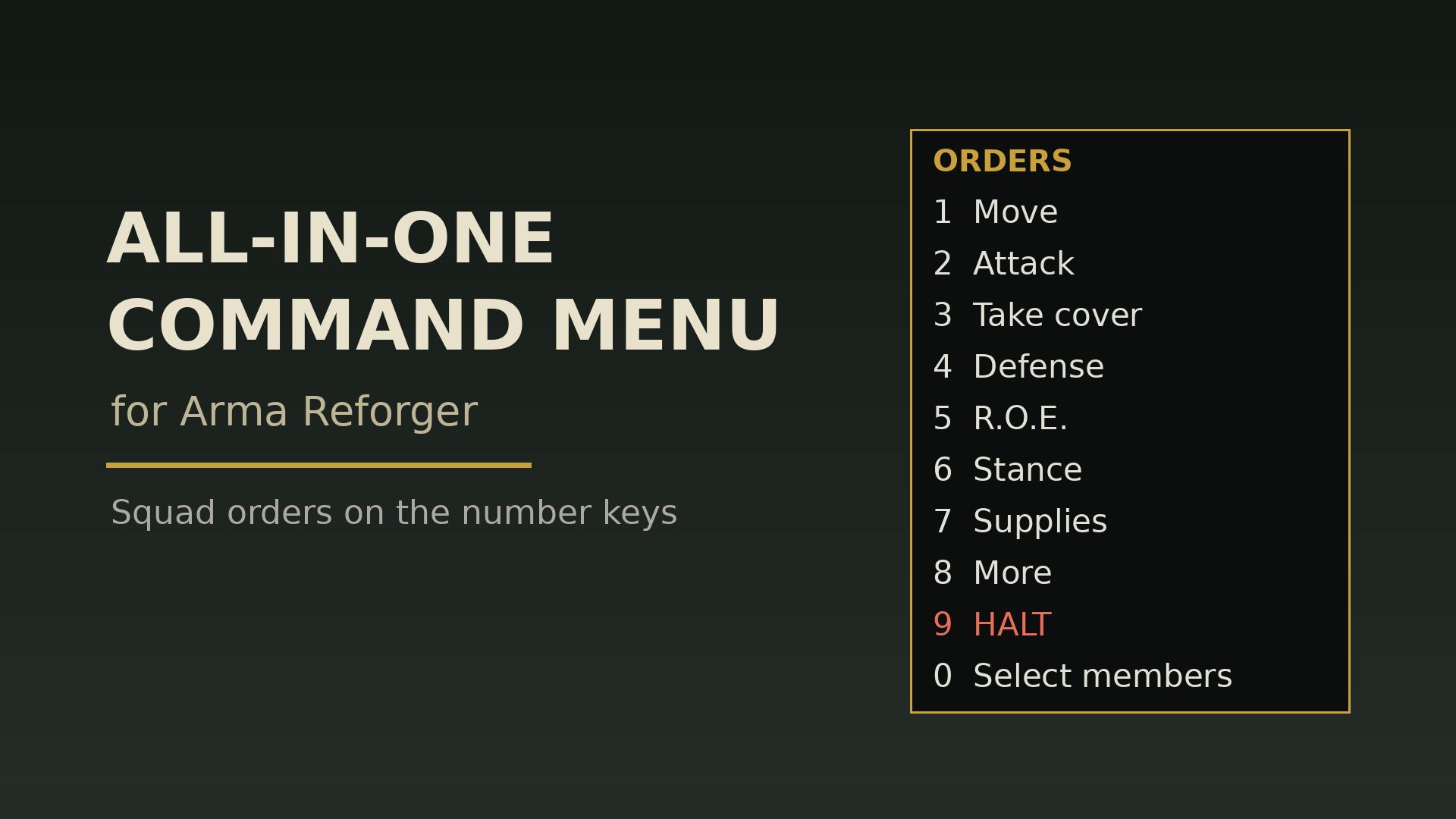
Ranking
Falling#45992.8
2Serversrunning this mod
0Observed players nowon servers reporting this mod
148Estimated player-hours (partial)Partial 7-day data (72% coverage)
DeploymentTop 37%63.0ahead of 63% of tracked mods by servers running it
ActivityTop 43%56.7ahead of 57% of tracked mods by play on those servers (partial 7-day data)
Popularity60.5deployment and activity combined (partial 7-day data)
How those 2 installs happen100% traced
- Not identified as a dependency2
Last 30 days
2 latest4 peak, 15 Oct1 low, 14 Oct
Servers reporting the mod in each hourly observation. Covers 5 days of the last 30 days.
Daily values
| Day | Last | Peak | Low | Obs. |
|---|---|---|---|---|
| 14 Oct | 2 | 3 | 1 | 9 |
| 15 Oct | 3 | 4 | 1 | 24 |
| 16 Oct | 3 | 4 | 2 | 24 |
| 17 Oct | 3 | 4 | 2 | 24 |
| 18 Oct | 2 | 3 | 1 | 24 |
| 19 Oct | 2 | 3 | 1 | 16 |
0 latest8 peak, 18 Oct0 low, 14 Oct
Sampled player counts on servers reporting the mod; not unique players. Covers 5 days of the last 30 days.
Daily values
| Day | Last | Peak | Low | Obs. |
|---|---|---|---|---|
| 14 Oct | 0 | 2 | 0 | 9 |
| 15 Oct | 1 | 3 | 0 | 24 |
| 16 Oct | 2 | 4 | 0 | 24 |
| 17 Oct | 0 | 3 | 0 | 24 |
| 18 Oct | 3 | 8 | 0 | 24 |
| 19 Oct | 0 | 2 | 0 | 16 |
Calculated Oct 19, 2026, 3:27 PM UTCDerived from observed server and mod activity. Trend positions describe recent observed change, not future adoption.
Summary
A numbered command menu for your AI squad: move, flank, assault, suppress, take cover, garrison, rearm and more, on the number keys. Reforger port of Leopard20's All-in-One Command Menu.
Official Workshop description
AiO Command Menu (Reforger)
Your squad. Your orders.
Press T and use the number keys to move your AI squad, split it into colour teams, manage vehicles, take cover or resupply. An unofficial standalone Reforger rebuild based on Leopard20's All-In-One Command Menu for Arma 3.
PUT YOUR SQUAD TO WORK
- Move the whole squad, selected soldiers or colour teams. Set formations, stance, speed and rules of engagement.
- Push forward with arrival-driven bounding, peel back under cover, or send a team around a flank.
- Garrison a building, clear reachable interior positions, watch a direction or form an outward-facing defensive ring.
- Board vehicles and static weapons, choose seats, control engines/lights, dismount passengers or send soldiers to unflip a vehicle.
- Rearm, collect a weapon, heal up or send an available squadmate to treat a casualty using real medical supplies.
- Plan infantry routes and looping patrols. Stalled routes keep their plan: use More > Routes to resume or skip a waypoint. A compact HUD shows progress and blocked soldiers.
GET STARTED
1. Enable AiO and lead a player squad with linked AI. In Game Master, take control of a soldier to command the other AI in that group.
2. Press T. Use 1–9 to choose a line; 0 opens Select members from the top page. Backspace goes back, or clears selection on Select members.
3. Choose an order. No selection means the whole squad. Most orders close the menu.
4. For destinations, aim your camera or open the map and put the cursor where you want the order. Choosing the order uses that position immediately; there is no extra confirmation click.
Rebind T under Settings > Controls > All-in-One Command Menu. While the menu is open, number keys operate it instead of weapon/quick-slot selection.
Selection expires after about eight seconds with the menu closed; check the recipients in the heading before giving another order. Formations and squad admin commands always affect the whole squad. Colour-team assignments last for the current mission.
The full squad bar shows names, team colours, health, magazines and tasks while the menu is open. More > Squad bar on/off toggles it and nearby soldier numbers. Compact status remains visible with the menu closed, showing recipients, route progress, paused bound/peel reasons and commanded treatment.
Admin commands appear only when the server permits them. Teleport your squad to a target with relative spacing, or teleport your vehicle with everyone aboard. Teleport to my map cursor requires the map open: drivers bring their vehicle and occupants; passengers and gunners teleport out alone.
REQUIREMENTS
Requires Arma Reforger, with no other mod dependencies. Load AiO on the server and joining clients; it is not client-only.
KNOW YOUR SQUAD'S LIMITS
AiO commands your existing squad: it does not recruit soldiers or command arbitrary groups from the Game Master camera. Nearby friendly AI are not automatically yours.
Buildings, doors and vehicle routes still depend on Reforger's navigation. Clear building visits sampled reachable positions; it does not promise every room or enemy is cleared. Fortify here finds cover; it does not construct fortifications.
Bounding needs ready covering soldiers and can pause under suppression, casualties or blocked movement. Use Attack > Resume bound / peel when requested. Follow or a new movement order lets you regroup.
BBB is optional. Compatible BBB builds can lower weapons during quiet ordinary travel; tactical orders retain readiness. Combining AiO with another squad-command menu mod, including Enhanced AI Squad Commands, is unsupported.
FULL GUIDE AND BUG REPORTS
The full Reforger guide covers every menu, route planning, bounding, selection, targeting and server admin options:
https://github.com/propst-design/AIOCommandMenu
Report bugs:
https://github.com/propst-design/AIOCommandMenu/issues
Include mod/game versions, scenario, other mods, host/client role, the menu path, recipients, camera/map targeting, and what happened versus what you expected. Attach console.log and script.log from the newest affected session under Documents\My Games\ArmaReforger\logs. Custom profiles and dedicated servers may use another location; multiplayer reports benefit from server and affected client logs.
CREDITS AND LICENCE
Original Arma 3 mod and design reference: Leopard20's All-In-One Command Menu. Unofficial Reforger rebuild by Jacob (propst-design), developed with Claude (Anthropic) and Codex (OpenAI). Use the Reforger guide for this version.
GNU GPL version 3 or later. Script source, LICENSE.md and COPYING ship with the mod.
License
License and credits
All-in-One Command Menu for Arma Reforger is a derivative work: a rebuild, for
Arma Reforger's engine, of All-In-One Command Menu for Arma 3.
Original work
- All-In-One Command Menu (Deluxe) for Arma 3, by Leopard20:
https://github.com/leopard20/All-In-One-Command-Menu
- Licensed under the GNU General Public License v3.
Changes made
This is not a copy of the original files. The menu was rebuilt in Enforce Script
(instead of SQF) following the original's design: a numbered command menu for the
player's AI squad, orders to selected men, defense, stance and rules-of-engagement
orders, and a cheats/admin page. The layout of the menu, member selection, colour
teams and the way orders reach Reforger's AI are new. No Arma 3 assets (models,
textures, icons, sounds) are included.
Who made this port
Directed, designed and play-tested by Jacob (propst-design), developed with
Claude (Anthropic) and Codex (OpenAI). It is an unofficial fan project, not
affiliated with or endorsed by Bohemia Interactive or Leopard20.
License of this work
Copyright (C) 2026 Jacob (propst-design).
This program is free software: you can redistribute it and/or modify it under the
terms of the GNU General Public License as published by the Free Software
Foundation, either version 3 of the License, or (at your option) any later version.
This program is distributed in the hope that it will be useful, but WITHOUT ANY
WARRANTY; without even the implied warranty of MERCHANTABILITY or FITNESS FOR A
PARTICULAR PURPOSE. See the GNU General Public License for more details.
The full license text is in COPYING (included with the mod) and at
https://www.gnu.org/licenses/gpl-3.0.html. Source code:
https://github.com/propst-design/AIOCommandMenu
Arma Reforger content used at runtime belongs to Bohemia Interactive and is not
redistributed here.
Working with Jacob's other mods
This mod shares no code with Arma Commander Actual (Arma Public License
Share-Alike, which is not GPL-compatible). The two mods only talk to each other
while the game runs, and each works without the other.
Servers running this mod
22 currently listed servers report AiO Command Menu -Reforger- in its mod list. Showing the 2 with the most players.
- Geeking SquadOnline · Conflict - Kolguyev PVE0 / 10players
- muthurOnline · Eden - Frontline PvP0 / 10players
Versions
50.3.1Game 1.8.0.13 · 179 KiB · Oct 18, 2026
Dependencies: 0Scenarios: 0PublishedApproved
- Updated Workshop guidance for route recovery, persistent status and squad/vehicle teleport options.
- Added Admin > Teleport squad (where I look) to teleport the player and whole squad together to a target point/map cursor, maintaining relative formation spacing and non-colliding slots so units do not overlap.
- Added Admin > Teleport with vehicle to teleport the player's vehicle and all occupants inside it to the target point/map cursor.
- Added Admin > Teleport to my map cursor. Drivers bring their vehicle and its occupants; passengers and gunners teleport out alone. Requires the map open.
- Stalled routes now pause with the remaining plan intact, identify blocked soldiers and waypoint, and offer Resume or Skip waypoint under More > Routes. Recovery follows selected route members; skipping never counts as arrival.
- Added compact persistent feedback for current recipients, route/patrol progress, paused bound/peel reasons and commanded treatment. The full squad bar remains menu-only.
config.json entry
{
  "modId": "629405AEFC950C12",
  "name": "AiO Command Menu -Reforger-",
  "version": "0.3.1"
}Use AiO Command Menu -Reforger- on your server
Add AiO Command Menu -Reforger- to the game.mods array of your server config.json. The config generator builds the full file, the mod manager keeps the mod list and its dependencies organized, and the config validator checks an existing config. The adding mods guide and mod dependencies guide walk through it step by step.
Fetch this mod from the API
The same metadata is available as JSON. See the API quickstart, the V2 reference, or the V1 reference.
GET https://api.reforgermods.net/v2/mods/629405AEFC950C12
GET https://api.reforgermods.net/v2/mods/629405AEFC950C12/versions
Data is cached from Arma Reforger Workshop metadata and may be stale. reforgermods.net is independent and is not affiliated with Bohemia Interactive.