

published · approved · 11.5 KiB
Workshop mod by Medoedovich
Conflict Points Spawn Helpers Arma Reforger Mod
Place Conflict bases and supply sources with confidence: preview where objects will appear and which way the supply storage interaction sign will face.
5772AF43F501410A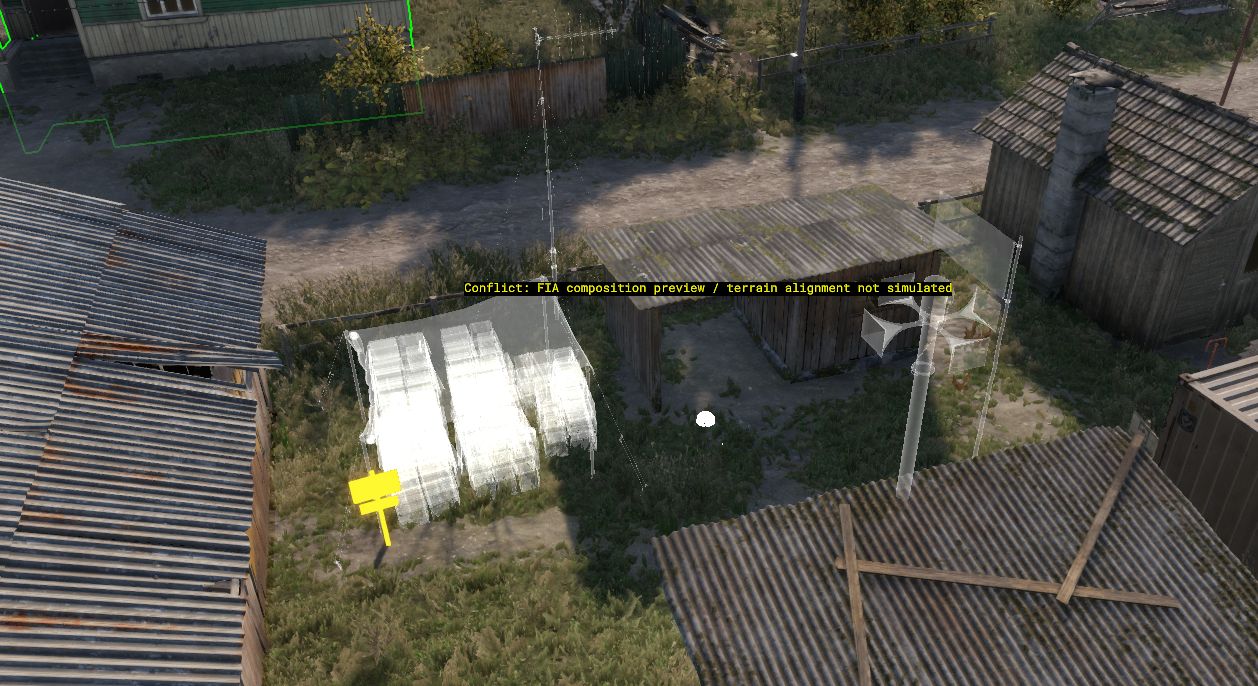
Ranking
Popular#1227357.1Falling#473410.5
1Serversrunning this mod
0Observed players nowon servers reporting this mod
76Estimated player-hours (7d)7-day data
DeploymentTop 43%56.5ahead of 57% of tracked mods by servers running it
ActivityTop 42%58.0ahead of 58% of tracked mods by play on those servers
Popularity57.1deployment and activity combined
How those 1 installs happen100% traced
- Required by another mod1
Last 30 days
1 latest2 peak, 25 Oct0 low, 10 Oct
Servers reporting the mod in each hourly observation. Last 30 days. Shaded bands mark periods with no observations, which is not the same as zero.
Daily values
| Day | Last | Peak | Low | Obs. |
|---|---|---|---|---|
| 10 Oct | 0 | 0 | 0 | 23 |
| 11 Oct | 0 | 0 | 0 | 24 |
| 12 Oct | 1 | 1 | 0 | 24 |
| 13 Oct | 0 | 1 | 0 | 24 |
| 14 Oct | 0 | 0 | 0 | 24 |
| 15 Oct | 0 | 0 | 0 | 24 |
| 16 Oct | 0 | 0 | 0 | 24 |
| 17 Oct | 0 | 0 | 0 | 24 |
| 18 Oct | 0 | 0 | 0 | 24 |
| 19 Oct | 0 | 0 | 0 | 24 |
| 20 Oct | 0 | 0 | 0 | 24 |
| 21 Oct | 0 | 0 | 0 | 24 |
| 22 Oct | 0 | 0 | 0 | 24 |
| 23 Oct | 0 | 0 | 0 | 24 |
| 24 Oct | 0 | 0 | 0 | 24 |
| 25 Oct | 0 | 2 | 0 | 24 |
| 26 Oct | 0 | 0 | 0 | 24 |
| 27 Oct | 0 | 0 | 0 | 24 |
| 28 Oct | 0 | 1 | 0 | 24 |
| 29 Oct | 0 | 1 | 0 | 24 |
| 30 Oct | 0 | 1 | 0 | 24 |
| 31 Oct | 0 | 0 | 0 | 24 |
| 1 Nov | 0 | 0 | 0 | 24 |
| 2 Nov | 1 | 1 | 0 | 24 |
| 3 Nov | 1 | 1 | 0 | 24 |
| 4 Nov | 1 | 1 | 1 | 24 |
| 5 Nov | 0 | 1 | 0 | 24 |
| 6 Nov | 1 | 1 | 0 | 24 |
| 7 Nov | 1 | 1 | 1 | 24 |
| 8 Nov | 1 | 1 | 0 | 21 |
| 9 Nov | 1 | 1 | 1 | 1 |
0 latest5 peak, 8 Nov0 low, 10 Oct
Sampled player counts on servers reporting the mod; not unique players. Last 30 days. Shaded bands mark periods with no observations, which is not the same as zero.
Daily values
| Day | Last | Peak | Low | Obs. |
|---|---|---|---|---|
| 10 Oct | 0 | 0 | 0 | 23 |
| 11 Oct | 0 | 0 | 0 | 24 |
| 12 Oct | 0 | 1 | 0 | 24 |
| 13 Oct | 0 | 2 | 0 | 24 |
| 14 Oct | 0 | 0 | 0 | 24 |
| 15 Oct | 0 | 0 | 0 | 24 |
| 16 Oct | 0 | 0 | 0 | 24 |
| 17 Oct | 0 | 0 | 0 | 24 |
| 18 Oct | 0 | 0 | 0 | 24 |
| 19 Oct | 0 | 0 | 0 | 24 |
| 20 Oct | 0 | 0 | 0 | 24 |
| 21 Oct | 0 | 0 | 0 | 24 |
| 22 Oct | 0 | 0 | 0 | 24 |
| 23 Oct | 0 | 0 | 0 | 24 |
| 24 Oct | 0 | 0 | 0 | 24 |
| 25 Oct | 0 | 2 | 0 | 24 |
| 26 Oct | 0 | 0 | 0 | 24 |
| 27 Oct | 0 | 0 | 0 | 24 |
| 28 Oct | 0 | 1 | 0 | 24 |
| 29 Oct | 0 | 2 | 0 | 24 |
| 30 Oct | 0 | 0 | 0 | 24 |
| 31 Oct | 0 | 0 | 0 | 24 |
| 1 Nov | 0 | 0 | 0 | 24 |
| 2 Nov | 0 | 1 | 0 | 24 |
| 3 Nov | 0 | 2 | 0 | 24 |
| 4 Nov | 1 | 3 | 0 | 24 |
| 5 Nov | 0 | 1 | 0 | 24 |
| 6 Nov | 0 | 4 | 0 | 24 |
| 7 Nov | 4 | 4 | 0 | 24 |
| 8 Nov | 0 | 5 | 0 | 21 |
| 9 Nov | 0 | 0 | 0 | 1 |
Calculated Nov 9, 2026, 12:35 AM UTCDerived from observed server and mod activity. Trend positions describe recent observed change, not future adoption.
Summary
Place Conflict bases and supply sources with confidence: preview where objects will appear and which way the supply storage interaction sign will face.
Official Workshop description
Conflict Spawn Helpers shows previews of the compositions that Conflict creates at military bases and supply sources when a mission starts. Use the holograms to leave room for tents, supply storage, and other objects while building your scenario in Workbench.
Supported points
• ConflictBase_MOB
• ConflictControlPoint
• ConflictSourceBase_T1Harbor
• ConflictSourceBase_T2Harbor
• ConflictSourceBase_T3Harbor
Features
• Shows composition geometry from the world's configured campaign factions before you enter Game mode.
• Updates previews when points move or rotate.
• Auto uses an ordinary point's default faction. When none is assigned, it reads the INDFOR faction configured in the current Conflict GameMode.
• For HQ candidates, Auto shows one composition with the largest rectangular footprint, plus a yellow rectangle enclosing the preview geometry of all available variants. The caption explains that the final composition may occupy less space.
• Highlights the construction-supply sign with a solid bright orange material so it is easier to locate.
• Fills flag cloth with the shown composition's faction color from the world's FactionManager; the flagpole keeps the regular hologram look. The combined HQ preview stays neutral in Auto.
• Lets you toggle previews and cycle through Auto, US, USSR, and FIA without changing the mission's faction assignments.
• Cleans up previews when points are deleted and during Edit/Game transitions. Preview geometry has no physics and is not saved as mission objects.
• Includes unnamed.ent, a Workbench test world with base points and faction-specific Harbor examples.
How to use
1. Load the addon in Workbench and open your Conflict world in World Editor.
2. Make sure the world has a CampaignFactionManager with the required campaign factions and building compositions configured.
3. Place one of the supported points, or inspect points already present in the scenario. Previews are enabled by default for visible points.
4. Open Plugins → [ME] Conflict Spawn Helpers → Toggle Conflict spawn previews to show or hide the helpers.
5. Use Cycle Conflict preview faction (Auto/US/USSR/FIA) to inspect a specific faction's composition. Manual faction selection hides the combined HQ outline.
6. Leave space around the preview and check the actual composition in Game mode, especially on slopes.
Notes and limitations
• This is a Workbench mission-making helper. It does not change Conflict's runtime spawning or base ownership.
• Terrain alignment is not simulated. Heights and slopes of individual objects may differ from the actual spawned composition.
• Previews use the game's preview geometry, which can be simplified. Custom preview prefabs are omitted and marked as partial.
• The HQ outline is a conservative rectangle around available preview geometry, not an exact collision outline or a prediction of the selected HQ faction. A candidate configured to disappear when not selected as HQ may have no composition at all.
• If an ordinary point's faction cannot be resolved, the helper shows the available unique composition variants. Overlapping holograms can be inspected using the manual faction selector.
• Orange highlighting recognizes descendants of the standard construction-supply sign prefab. Unrecognized custom signs keep the normal preview material.
• A colored flag identifies the faction of the shown composition, not a prediction of future base ownership. Unresolved factions and compositions shared by multiple factions keep a neutral flag.
• Auto can read custom campaign factions; the manual selector uses the vanilla US, USSR, and FIA keys. Compatibility with other mods has not been verified.
• Tested with Arma Reforger Workbench 1.8.0.13. The included test world is an editor demonstration, not a complete playable Conflict scenario.
• After changing addon scripts, restart Workbench. After changing composition resources, toggling previews or reopening the world may be necessary.
Source code and test project
https://github.com/trueMedoed/Conflict-Spawn-Helpers
The repository may contain development changes not yet included in the Workshop release.
Servers running this mod
11 currently listed server reports Conflict Points Spawn Helpers in its mod list. Showing the one with the most players.
- NA2 | Black Shields Proving Grounds | Eastern Block Bahkmut | UHC|Online · Eastern Block0 / 128players
Versions
21.0.1Game 1.8.0.13 · 11.5 KiB · Oct 1, 2026
Dependencies: 0Scenarios: 0PublishedApproved
• Filled preview flag cloth with each faction's color from the world's FactionManager, including configured custom factions. Auto keeps the combined HQ preview neutral while ordinary points retain their resolved faction color. Manual faction selection also colors HQ flags.
• Kept unresolved factions and compositions shared by multiple factions neutral.
config.json entry
{
  "modId": "5772AF43F501410A",
  "name": "Conflict Points Spawn Helpers",
  "version": "1.0.1"
}Use Conflict Points Spawn Helpers on your server
Add Conflict Points Spawn Helpers to the game.mods array of your server config.json. The config generator builds the full file, the mod manager keeps the mod list and its dependencies organized, and the config validator checks an existing config. The adding mods guide and mod dependencies guide walk through it step by step.
Fetch this mod from the API
The same metadata is available as JSON. See the API quickstart, the V2 reference, or the V1 reference.
GET https://api.reforgermods.net/v2/mods/5772AF43F501410A
GET https://api.reforgermods.net/v2/mods/5772AF43F501410A/versions
Data is cached from Arma Reforger Workshop metadata and may be stale. reforgermods.net is independent and is not affiliated with Bohemia Interactive.